Media Archive
The Media Archive displays a filterable grid of media items with YouTube-style cards.
Overview
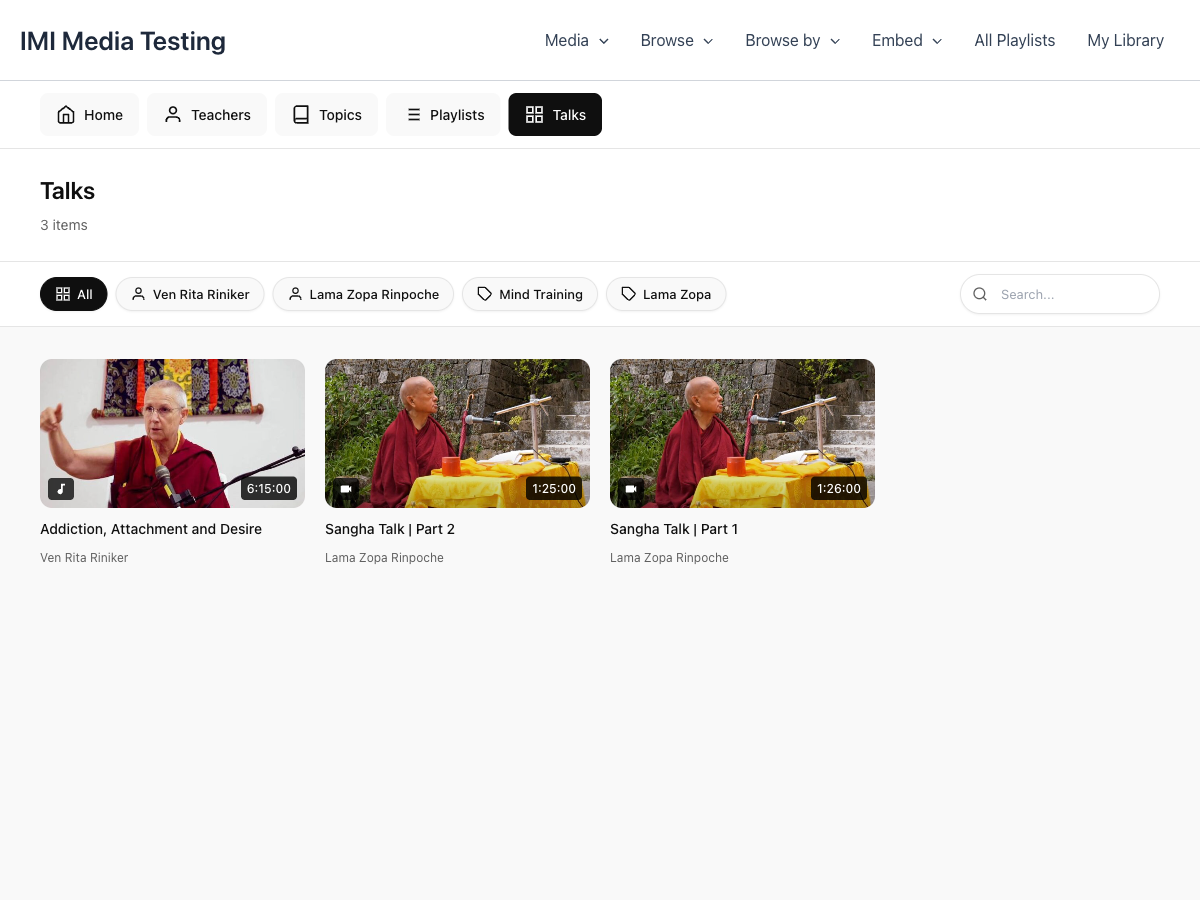
The Media Archive includes:
- Filter Chips - Horizontal scrolling filter buttons
- Search Bar - Find specific content
- Media Grid - Responsive card layout
- Pagination - Navigate through results
Adding to Your Site
Using Shortcode
With Filters
<!-- Only meditation content -->
[mindful_media_archive topic="meditation"]

<!-- Only video content -->
[mindful_media_archive type="video"]

<!-- Specific teacher -->
[mindful_media_archive teacher="john-smith"]

<!-- Featured items only -->
[mindful_media_archive featured="true"]
Pagination Options
<!-- 24 items per page -->
[mindful_media_archive per_page="24"]

<!-- Without pagination -->
[mindful_media_archive show_pagination="false"]
Filter Chips
Filter chips appear as horizontal scrolling buttons above the grid.
Available Filters
| Filter | Description |
|---|---|
| All | Show all items |
| Topics | Filter by topic |
| Teachers | Filter by teacher |
| Playlists | Filter by playlist |
| Categories | Filter by category |
| Audio | Show only audio |
| Video | Show only video |
Customizing Filters
Hide filters entirely:
Configure which filters appear in Settings → Archive & Browse.
Media Cards
Each media item displays as a card with:
- Thumbnail - 16:9 aspect ratio image
- Duration Badge - Bottom right corner
- Play Overlay - Appears on hover
- Title - Below the thumbnail
- Meta Info - Teacher, date, duration
Card Interaction
- Hover - Shows play button overlay
- Click - Opens modal player
Grid Layout
Responsive Columns
The grid automatically adjusts:
| Screen Width | Columns |
|---|---|
| Desktop (1200px+) | 5 columns |
| Large Tablet (992px+) | 4 columns |
| Tablet (768px+) | 3 columns |
| Mobile (576px+) | 2 columns |
| Small Mobile | 1 column |
Customizing Columns
Set the default columns in Settings → Layout → Items Per Row.
Search
The archive includes an inline search bar:
- Type to filter results
- AJAX-powered instant results
- Searches titles and descriptions
Pre-Filtering
Use shortcode attributes to create focused archives:
Teacher's Page
Topic Page
Featured Gallery
<h2>Featured Content</h2>
[mindful_media_archive featured="true" per_page="6" show_pagination="false"]
Styling
CSS Variables
Custom CSS
/* Card styling */
.mindful-media-card {
    /* Your styles */
}

/* Grid layout */
.mindful-media-archive-grid {
    /* Your styles */
}

/* Filter chips */
.mindful-media-filter-chips {
    /* Your styles */
}
Navigation URL
Set your archive page URL in Settings → Archive & Browse → Media Archive URL.
This URL is used for:
- "View All Media" links
- Breadcrumb navigation
- Return links from single media pages